FAQ
Split AVI -- Split MPEG -- Cut AVI -- Cut MPEG
1. Can you tell me the reason why I can't open my video files?
please install the K-Lite Codec, which can be downloaded at:
http://www.free-codecs.com/download/K_Lite_Codec_Pack.htm
The standard version is recommended.
2. I can't join, split my AVI files!
The most common reason is that the proper codec can’t be detected or install properly.
First, to see which avi codec your avi file is using?
It is recommended that you get the codec information by using mediainfo(software)
If it is DivX Codec, Please do as follows:
1. Download it DivX Codec from http://www.divx.com/
2. Install it.
3. Uninstall it
4. Re-Install it, Now your DivX codec is ok.
If it is Xvid codec, do as follow:
Koepie XviD Builds: http://www.roeder.goe.net/~koepi/
Here’s what I suggest you do in steps.
1. Install Koepi’s latest Unstable XviD build, which includes a relatively bug-free plain vanilla decoder
2. Whether you got XviD playback working or not (I normally would say, when you got it working already, but you are
a different case), install the latest FFDShow . Configure it to play XviD contents and nothing else.
If you avi is from DV, you can use the codec:
Panasonic DV Codec http://users.tpg.com.au/mtam/install_panvfwdv.htm
or
Mainconcept DV Codec http://www.mainconcept.com/codecs.shtml
3. I can't find the split mkv files? How can I get them?
During splitting process, our Video Splitter automatically divides the video you want to split into three parts:
xxxxx01.mkv: 0– start time
xxxxx02.mkv: start — end time
xxxxx03.mkv: endtime — duration
How to Split AVI, Spit MPEG, Split ASF, Split WMV
Step by Step
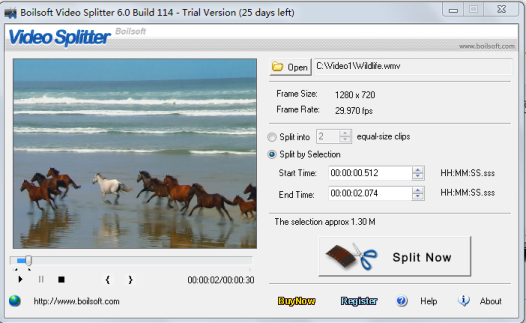
Step 1 : Click Open button to select AVI, MPEG, ASF, WMV files
Step 2 : Drag the Slider Bar to to the start, Select Start; Drag the slider Bar to the end, Select End.
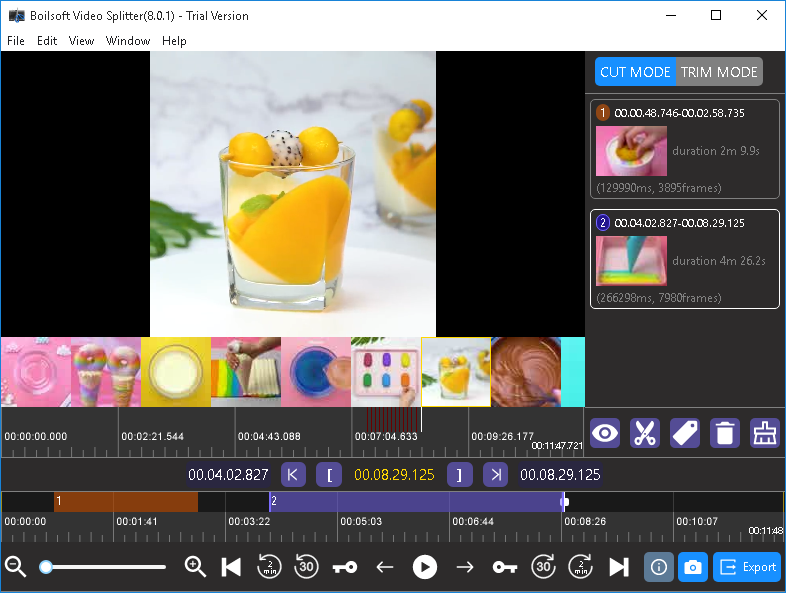
Step 3 : Click Split button to save the new clips.
Tutorials


Copyright © 2023 Boilsoft Systems International Inc. All rights reserved.